Access Database Repair v4.0

access repair

Access Database Repair is safe and easy to use software to repair and restore corrupt MDB and ACCDB files of Microsoft Access. The software thoroughly scans damaged database and restores it at original or user specified location. The Access Repair process is pretty fast and simple with three quick steps. This Access Database Repair software is compatible to restores damaged databases of Microsoft Access 2010, 2007, 2003, 2002 (XP), and 2000.


access repair free download  access repair buy now

Access File Repair software restores damaged, corrupt, or inaccessible MDB and ACCDB files in their original form, without modifying the structure and contents. Stellar Phoenix Access Recovery v4.0 software having more advanced features which repairs Access database tables, reports, forms, macros, indexes, relations, VBA code, password protected VBA code, and other database objects. It gives a preview of all the repairable database objects, like queries, reports, forms, and macros, in the free demo version. Access Database Repair Details...


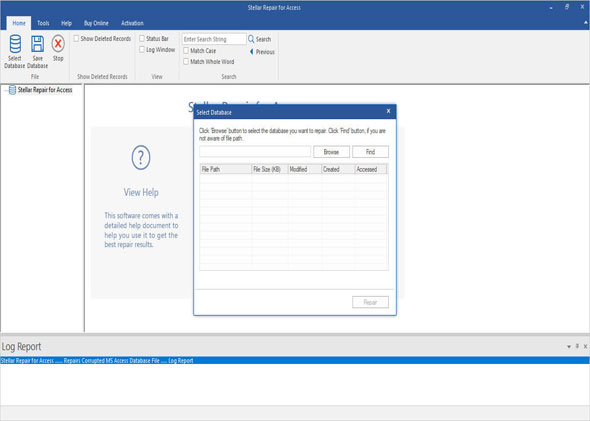
Stellar Phoenix Access Recovery v4.0 employs advanced database scanning mechanisms to efficiently scan corrupted Access database and extract all damaged objects, such as tables, forms, reports, modules, macros, VBA code, relations, indexes, constraints, and queries. The repaired objects are stored in a new database, which can be used with Access. Access File Repair software is having interactive graphical user interface which enables you to Repair Access File on your own.


  • Repairs tables, reports, forms, macros, VBA code, indexes, relations, queries, modules, and constraints.
  • Supports Microsoft Access 2010, 2007, 2003, 2002 (XP), and 2000.
  • Allows preview of corrupted tables, queries, indexes, keys, and relations.
  • Restores VBA code of reports.
  • Restores password protected VBA code for forms and modules.
  • Compatible with Microsoft Windows 7, Vista, XP, and 2000.
  • Searches for corrupted MDB and ACCDB files on logical volumes.
  • Lists all recoverable reports, macros, modules, and forms in a tree view format.
  • Allows searching for object in recovery tree.
  • Preserves absolute integrity of damaged database.

access repair free download  access repair buy now

Comparison of Stellar Phoenix Access Recovery v3.6 and Stellar Phoenix Access Recovery v4.0-

Features list

v3.6

v4.0

Support for Microsoft Access 2010

No

Yes

Preview of queries, relations, and indexes in application

No

Yes

Search MDB/ACCDB on logical volumes

No

Yes

Listing of Reports, Macros, Forms, and Modules in Tree View format

No

Yes

Recovery of VBA code for reports

No

Yes

Recovery of password-protected VBA code for forms and modules

No

Yes

Search option to find objects in the tree

No

Yes

Recovery of reports, forms, macros, and modules in ACCDB file

Partially Supported

Fully Supported

The most common reasons of Access database corruption are as given below:


  • Microsoft Access application malfunction.
  • Improper system shutdown.
  • Missing or corrupted system files of MS Access.
  • Virus infection.
  • Simultaneous modification of same database.
  • User errors.
  • Operating system crash or malfunction.
  • Faulty third-party plug-in.

I want to repair a corrupted Access database file. How can I do this using the Stellar Phoenix Access Recovery software?

You can do perform the database recovery using the following steps:

  • Open ‘Stellar Phoenix Access Recovery’.
  • Select ‘Open MS Access File’ from the ‘File’ menu.
  • Locate and double-click on the corrupted Access file.
  • Click on ‘Open’. You will be able to see the file path in the left-hand side pane.
  • Click on the ‘Start Repair’ button.
  • Select the location where you want to save the new database file.
  • After completion, a message is shown displaying the status of the repairing process.

You can open the new database file from the destination folder.


Should I exit MS Access if I were to scan the corrupted Access database file?

Yes, in order to scan any corrupted Access database you should exit MS Access.


Do I need to have MS Access installed on my computer system to repair the Access database?

Yes, having MS Access installed on your PC is one of the pre-requisites to repair the corrupted databases.


Does this software overwrite the corrupted database during the scanning process?

No, this software does not overwrite the original file while scanning and repairing it. After scanning, it produces a fresh database containing the original and clean data.


How much time it takes to scan and repair the corrupted Access database file?

The time taken to scan and repair a corrupted database file is dependent on the corruption level and the size of the file.


I have downloaded the Demo version and scanned the corrupted Access database file. I am able to view the recoverable database components. What should I need to do to save the data?

The Demo version is capable of displaying the database components that can be recovered using this software. However, to save the components you should buy the Full version of the software.


I have a corrupted database of MS Access 2000. Can this software repair the database?

Yes. In fact, this software supports various other versions of MS Access such as Access 2000, 2002, 2003, 2007, and 2010.


Stellar Phoenix Access Password Recovery


access password recovery

Coming Soon

Access Password Recovery Software recovers lost or forgotten passwords from password protected Access databases.

Stellar Phoenix Windows Data Recovery


windows-data-recovery

Stellar Phoenix Windows Data Recovery is data recovery software that can successfully recover lost or deleted MS Access databases files. In addition, it recovers office documents, photos, videos, database files from lost, deleted, or formatted hard drives.